---
title: ioGates - Features - Share and Review for Video Post-Production
description: Explore our feature-packed platform for seamless video collaboration. From secure sharing to effortless transformation, ioGates empowers your media workflow with total control and peace of mind
image: https://www.iogates.com/hubfs/ioGates%20HP%20Features%20Intro-min.webp
---

# Simple Sharing Total Control

Secure media sharing designed for all video professionals. Centralise your media files for streamlined share and receive with clients and partners, accommodating any file type and size.

##### Share Your Video

Share videos effectively with ShareLinks, blending control and customisation for stronger collaboration.

[Learn More ](https://www.iogates.com/features#share-link)

##### Secure Your Video

Secure every stage of your video production with robust security features for total peace of mind.

[Learn More ](https://www.iogates.com/features#secure-link)

##### Transform Your Video

Transform videos smoothly with our intuitive tools, ensuring a seamless journey from raw footage to polished output.

[Learn More ](https://www.iogates.com/features#transform-link)

##### Manage Your Video

Efficiently control your media with our streamlined library and versatile apps, enhancing your media experience.

[Learn More ](https://www.iogates.com/features#manage-link)

- <https://www.iogates.com/features#features-home> Home
- <https://www.iogates.com/features#share-link> Share
- <https://www.iogates.com/features#secure-link> Secure
- <https://www.iogates.com/features#transform-link> Transform
- <https://www.iogates.com/features#manage-link> Manage

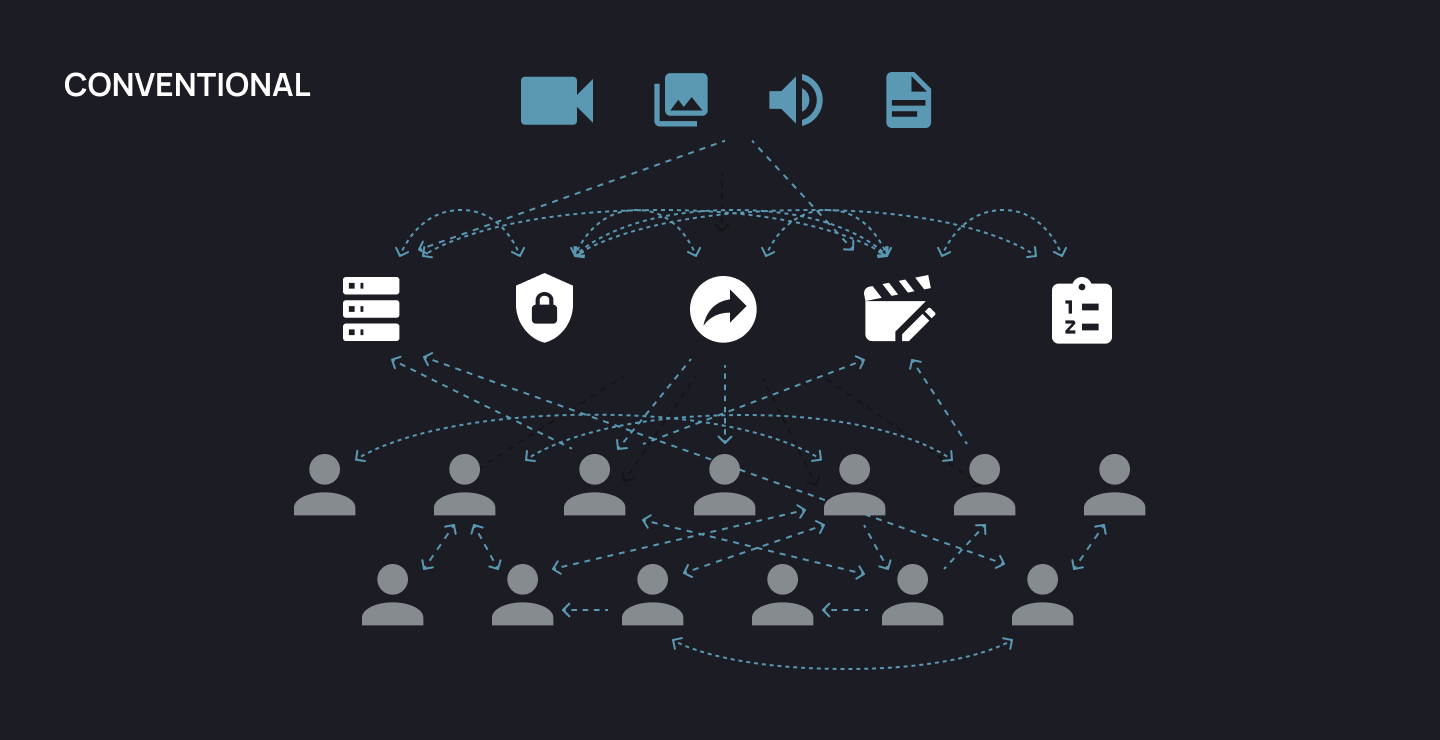
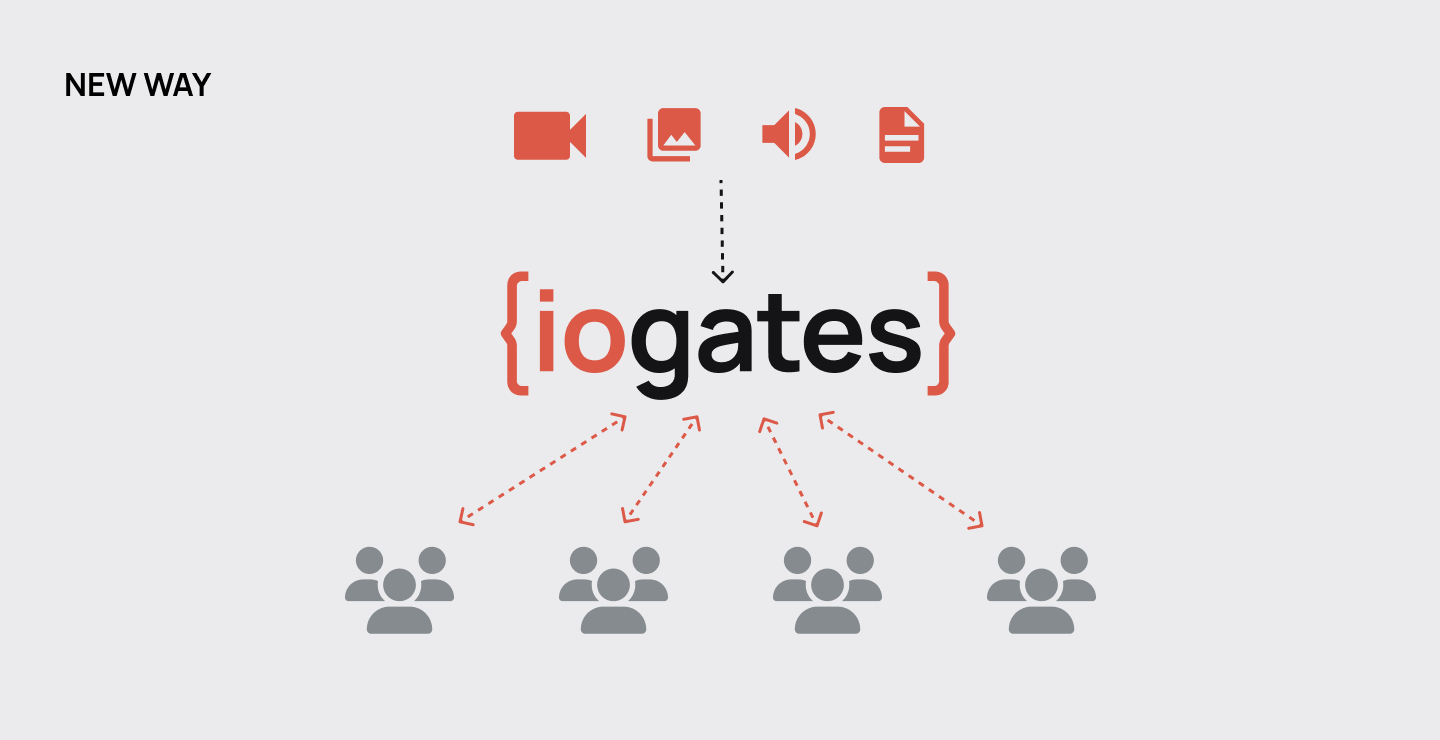
01A Better Way

## Workflows Reimagined

![color photo](https://www.iogates.com/hubfs/IOGates/Module%20Images/iogates-conventional-1.png) ![black and white](https://www.iogates.com/hubfs/IOGates/Module%20Images/iogates-new-way.png)

02Share Your Video

## Share Your Video

Simple Sharing with Maximum Control

ioGates ShareLinks give you optimal sharing control, efficient post-share management, fluid collaboration, and smart automation. These features integrate seamlessly into your post-production workflow, setting the stage for refined project execution and collaborative freedom.

[Discover ShareLinks](https://www.iogates.com/pricing?hsLang=en)

02. A — ShareLinks

Seamless Sharing with ShareLinks

![blake-jones copy-min](https://www.iogates.com/hs-fs/hubfs/blake-jones%20copy-min.webp?width=1792&height=1024&name=blake-jones%20copy-min.webp)

Control your content and adjust access, even after sharing.

Scale effortlessly without compromising function or experience.

Personalise your ShareLinks with custom branding options.

Bundle contacts into groups for faster sharing.

Manage share options such as master/proxy downloads, Comments, Transcriptions, Upload, Metadata, and Descriptions.

Get automatic notifications for new comments, new files, or both.

02. B — Post-Share Management

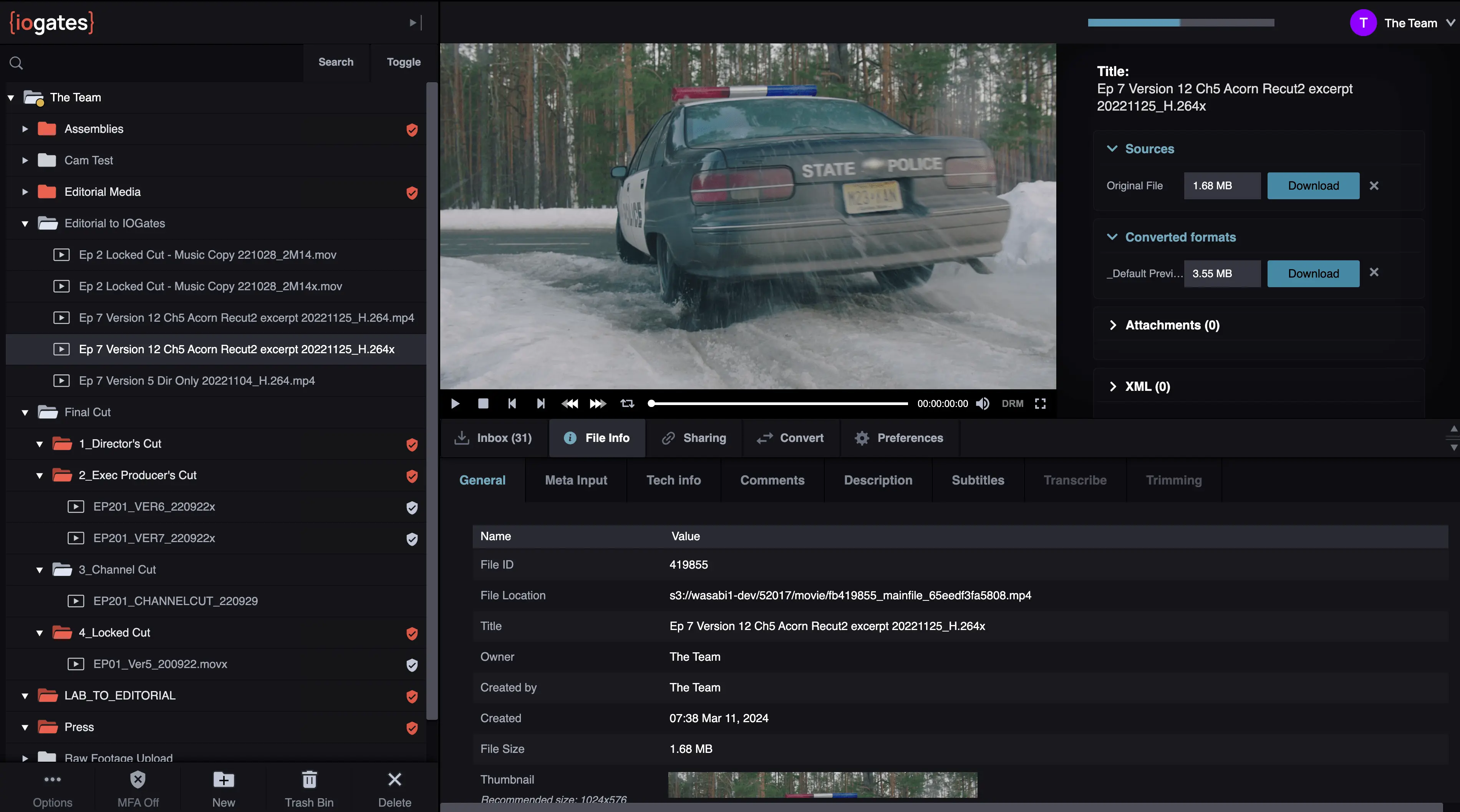
### Master Your Post-Share Workflow

Modify contacts, groups, and permissions dynamically without resending.

Stay informed with automatic alerts for new content or comments.

Enhance security and accuracy with personalised watermarks and metadata.

Automatic email delivery confirmation.

Download .csv, text or PDF files of the contextual comments.
![](https://www.iogates.com/hubfs/fb419871_mainfile_65eeed5010bbc-min.webp)

02. C — Collaboration

### Foster Fluid Collaborations

Centralise communication with contextual comments and frame-accurate timecodes.

Simplify bulk sharing and uploading by setting up group addresses.

Manage group sharing and permissions effortlessly.

Activate Two-Way Sharing so collaborators can upload footage to the same ShareLink.

Allow clients to view transcription on your ShareLinks

Enable users to download either master or any transcoded formats.

02. D — Automation

### Automate and Accelerate

Combine ioGates features to create custom workflows.

Stay informed in real-time with automated notifications for new file additions and comments.

Leverage pre-defined triggers to automate tasks like transcoding and distribution.

Use QScan Automated Quality Control to ensure only files that pass your QC standards move forward.

[Discover ShareLinks](https://www.iogates.com/pricing?hsLang=en)

03Secure Your Video

## Secure Your Video

Unyielding Security for Every Production

In video production, security is paramount. iogates ensures a safe environment for sharing and managing your content at every stage, ensuring that all content is protected on the move and at rest.

[Discover Secure Sharing](https://www.iogates.com/pricing?hsLang=en)

03. A — Sharing Security

Share With Confidence at Every Stage

![editor-at-desk-3](https://www.iogates.com/hs-fs/hubfs/editor-at-desk-3.jpg?width=1024&height=1024&name=editor-at-desk-3.jpg)

Control access so only authorised individuals can reach your shared content.

Opt for Digital Rights Management (DRM) protected video streaming.

Encryption ensures your content remains secure through its journey.

Protect your content from unauthorised access and distribution with highly secure links.

Utilise Two-Factor Authentication for an added layer of security on ShareLinks.

Set a ShareLink Password for simplified access, with a "one password for all users" functionality.

03. B — IT Security

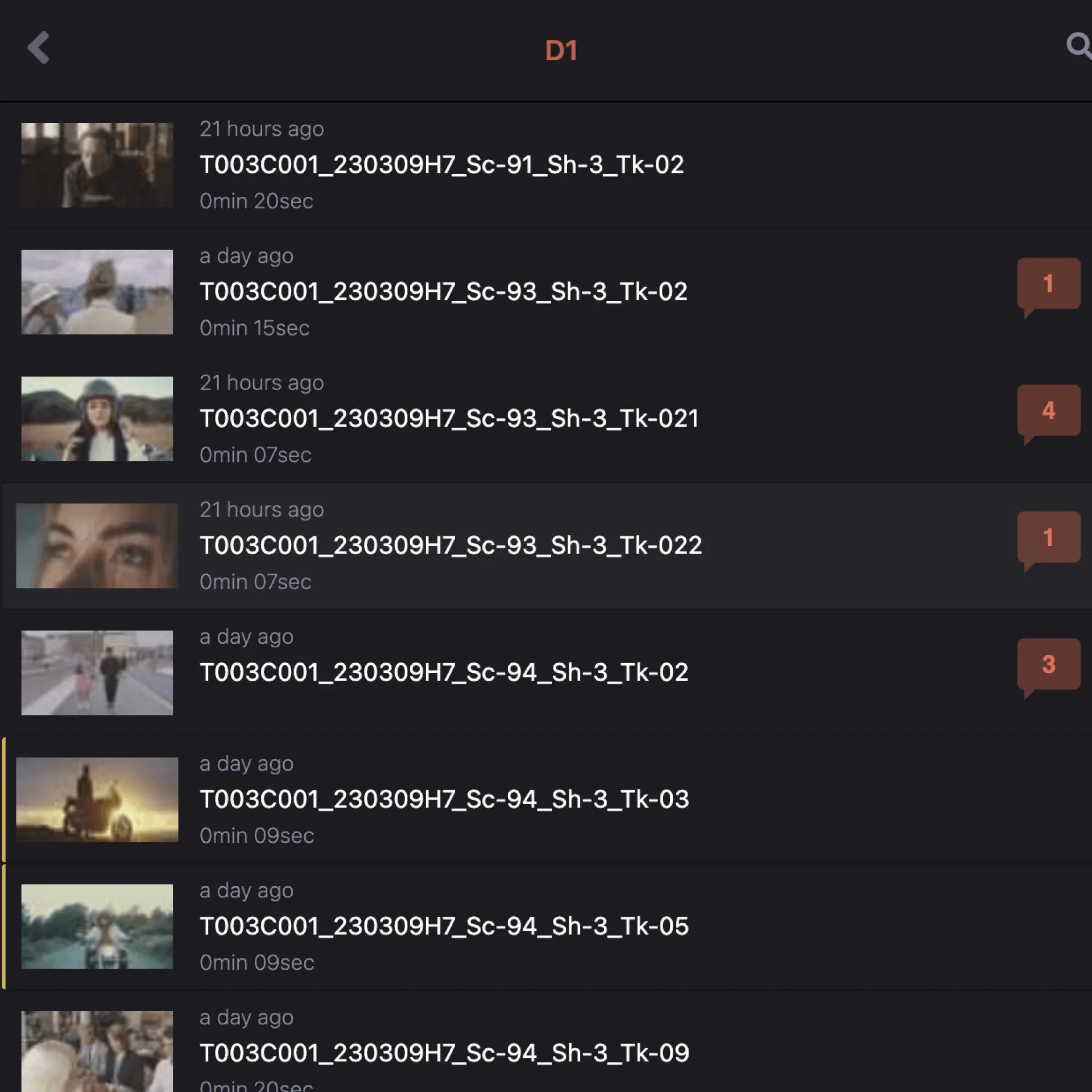
Data Safeguards You Can Trust
![ShareList-min](https://www.iogates.com/hs-fs/hubfs/ShareList-min.webp?width=1920&height=1920&name=ShareList-min.webp)

Employs strong HTTPS SSL encryption, with non-essential ports and links blocked.

ioGates employees are trained in best practice security standards.

All power and networking have failover redundancies for continuous service.

Team iogates strictly comply with source code licensing, anonymised data, and assigning and distributing access keys.

Our data centres are ISO 27001 and SOC2 compliant and housed in a Tier 3 certified location.

We are TPN Trusted Partner Network certified.

[Discover Secure Sharing](https://www.iogates.com/pricing?hsLang=en)

Security Is Vital   
For a Lars Von Trier Production

Customer Spotlight: Real-World Security Triumphs with iogates

“With all the hype around Lars Von Triers productions, the security aspect is crucial to us. Our previous system didn’t work, and we were in the midst of upping our security, So we changed to ioGates. It’s secure, easy to use, and Jesper and Tobias are always eager to help.”

###### — Simon Lytting, Technical Manager at Zentropa Post Production

[Read The Full Story](https://www.iogates.com/graceful-work-the-iogates-blog/danish-productions-seldom-attract-widespread-attention-unless-linked-to-lars-von-trier?hsLang=en)

![](https://www.iogates.com/hubfs/Lars.png)

04Transform Your Video

## Transform Your Video

Effortless Transformation, Elevated Execution

Intuitive Sub-clipping, Workflow tools, and transcoding streamline video management, enabling a smooth transition from raw footage to polished content.

[Discover Transformation](https://www.iogates.com/pricing?hsLang=en)

04. A — Sub-Clipping

### Trim, Tag, and Tailor with Sub-clipping

Define in and out points with ease, ensuring precise segment selection.

Add metadata to clips for structured search and organisation.

Create multiple sub-clips from a source file, each with its own name.

Combine all sub-clips into one file

Select the output format for the sub-clip.

![](https://www.iogates.com/hubfs/ioCorpo1-min.webp)

04. B — Transcode

### Fluid Formatting for Every Destination

Transcode any video file to most codecs and formats.

Automate transcoding to suit your content to its intended platform

Incorporate transcoding into automated workflows for efficient processing.

![](https://www.iogates.com/hubfs/fb419926_mainfile_65f06cddf1be9-min.webp)

04. C — Subtitles

### Craft Clarity with Captions

Overlay subtitling for real-time viewing Import and export subtitle files seamlessly for a smooth workflow.

Support for multiple languages

Burn-in subtitles on media files across any codec for permanent captioning.

04. D — Quality Control

### Precision Quality Checks

Utilise QScan Automated Quality Control features within ioGates for detailed QC.

Run QC, get reports, and attach them to the source file for organised review.

Incorporate QC into automated workflows for streamlined quality assurance.

[Discover Transformation](https://www.iogates.com/pricing?hsLang=en)

05Manage Your Video

## Manage Your Video

Smooth Management from Ingest to Playback

Effortlessly steer your media from ingest to playback with ioGates. Our user-friendly library and intuitive desktop and mobile apps ensure a seamless management experience.

[Start Managing](https://www.iogates.com/pricing?hsLang=en)

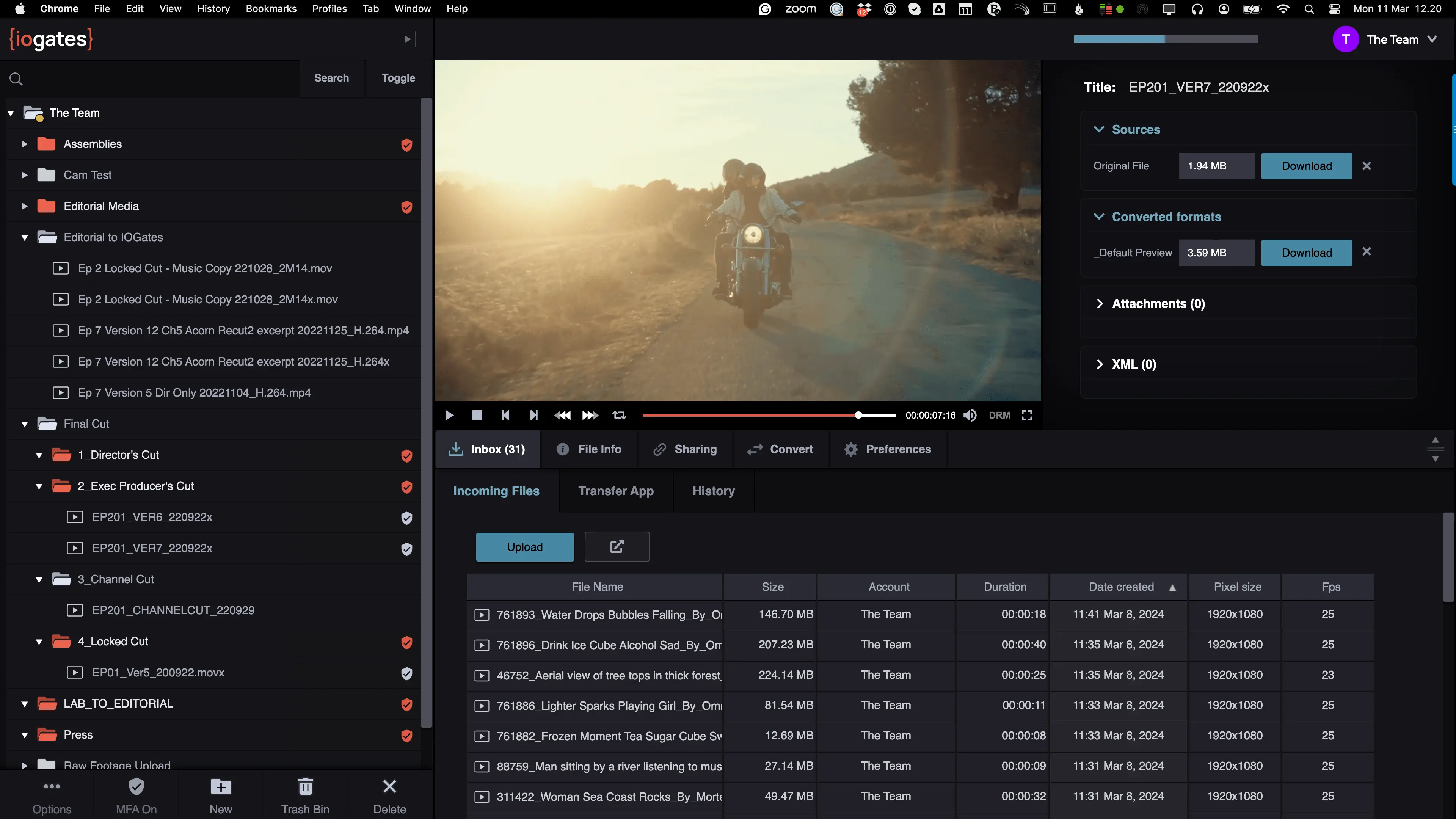
05. A — Ingest

### Ingest with Ease

Upload your folders, and they will be recreated in the ioGates library.

Automate upload and download with ioGates Transfer App.

Fast and reliable file transfers.

Your way, ingest via mobile and desktop transfer apps, web upload, FTPS*, and S3

![](https://www.iogates.com/hubfs/fb419871_mainfile_65eeed5010bbc-min.webp)

05. B — Library

### Your Media Library, Organised

Navigate and manage media using our familiar, tree-based folders.

Move and copy files with drag and drop or keyboard shortcuts.

Link any folder with a local folder using the ioGates transfer app for auto upload and download.

Create Alias folders for advanced workflows.

Automate deletions on any folder, choosing either the master, proxy or transcoded files.

Archive individual files or folders while retaining proxy previews so you always can view your full library.

Restore single files from the archive.

![](https://www.iogates.com/hubfs/editor-transform-min-min%20(2).webp)

06. C — Playback

### Playback Perfection

Enjoy a seamless playback experience across devices.

Multimedia ready with audio, image, PDF, and text file support.

Familiar J,K,L keyboard controls for easy navigation.

Built-in tools such as subtitles. chapter markers, frame stepping, looped playback, and more.

06. D — Apps

### Enhanced File Transfer

The Transfer app ensures automatic and reliable file transfers.

No need for passwords; Use ioGates share links to authenticate with the Transfer app.

Any folder can be linked with your clients or partners' local folders securely.

Upload your media on the go with your mobile.

[Discover Management](https://www.iogates.com/pricing?hsLang=en)